
Textbook Adoption Process
- Log in to your myMiami faculty portal and select Faculty Textbook Adoption.
- Choose the course you wish to edit and select options beneath Course Adoption Details.
- To add a textbook, select Add Adoption. Once a text is added, you may add a Book Comment, re-sort, and delete items as needed.
- Textbooks are not required for this course. Choose this option if your course uses free materials in Canvas or online.
- Textbooks to be determined. This is the default status prior to textbook adoption. Choose this status only if a course is being redeveloped and you need extra time for textbook adoption. (Optional) Provide details in the Course Comments section.
- Open Educational Resources OER and/or library content required for this course. Provide additional details in the Course Comments section (optional).
- Inclusive Access content required for this course. Whenever possible, include a textbook adoption in case students require a different format.
- (Optional) Course Documents. This field is for guidance documents, such as a process for subscription or a course syllabus.
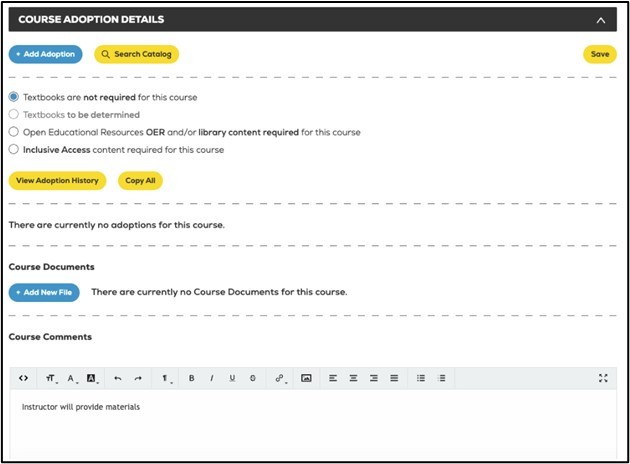
- Any time a change is made to a course, select Save.
- To view how the course will appear to students on the Online Bookstore, select the Preview Course button.
- Course Comments (Optional) Note that this field includes a rich text editor so that you can bold or enlarge text for better visibility. Course comments can stand alone or be associated with a textbook adoption.
- Example: “Purchase a course reading packet from the Oxford Copy Shop”
Timesavers
- View past adoptions by clicking View Adoption History. To add a previously used adoption, click Adopt this item and select Add Adoptions at the top.
- Use the Copy All feature to add the adoption(s) across multiple courses that require the same material(s).
Special Situations
Scenario | Action to take in eCampus |
|---|---|
Oxford Copy Shop course reading packet required | Mark No Textbook Required and add a course comment. |
Textbooks will be ordered directly from publisher on first day of class | Add textbook adoption(s) and add a course comment about purchase. |
Digital textbook is available for free (other than OER or library) | Add a course comment and provide the URL |
When a textbook has been adopted after the deadline, messages such as “Textbooks to be determined” or “No items listed” remain. | These messages are regularly reviewed, but can be deleted immediately by contacting eCampus at miamioh@ecampus.com |
Students can choose different editions of a book | Add a book or course comment |
All sections of a course will use the same book(s) (or no book at all) going forward | eCampus can set a blanket status for one semester or all future semesters. The status can be adjusted or removed at any time. Contact miamioh@ecampus.com for details. |
Contact
For eCampus Bookstore Support: miamioh@ecampus.com
For questions related to accessible format requests: AccessMU: accessmu@MiamiOH.edu
Contact
Contact Us
- Office of the Provost 209 Roudebush Hall 501 E. High St., Oxford, OH 45056
- 513-529-6721
- academicaffairs@miamioh.edu